Documenting SQL databases is rarely an enjoyable task, but if you need to learn a new database, or simply provide others with a blueprint for an existing database, the reality is that at some point you will need to document the database. The challenge of course is to find the simplest, most complete way to produce the output document. A search of the Internet will turn up a number of potential solutions, including DBDocumentor.
DBDocumentor is unique in its approach to documenting an SQL database. Unlike other solutions which rely upon the metadata contained in the actual database to provide the relationships, DBDocumentor includes an SQL parser. Using a dedicated SQL parser has several benefits, not the least of which are the ability to document dynamic SQL, the structure of result sets, and how data is being accessed, and from where.
Note: While this example uses the SQL Server 2005 sample database, Adventure Works Cycle, the steps presented below can be used with any SQL database from one of the supported SQL dialects in DBDocumentor. The SQL parser in DBDocumentor 4.40 supports TSQL from Microsoft SQL Server and Sybase SQL Anywhere, Firebird 1.5 SQL dialect 3 and Firebird 2.0, and Sybase SQL Anywhere Watcom SQL.
In order to completely execute this tutorial, you will need three things:
A copy of DBDocumentor, and if you do not have that, it is covered in the first step of the tutorial
A copy of the Microsoft SQL Server 2005 Adventure Works Cycle sample database SQL script.
Optionally, a DBDocumentor registration key. If you do not have a registration key, you can still follow this tutorial. The only difference you will experience is that you will not be able to document the entire sample database.
In this tutorial, you will download DBDocumentor, create a project file and produce an output HTML Help document describing the Adventure Works Cycle sample database, all in under five minutes. Assuming you are running a registered version of DBDocumentor, and you decide to document all the SQL objects, the output document will contain every SQL object in the source file, complete with the annotations supplied by Microsoft. All included objects will be hyperlinked for easy cross reference.
DBDocumentor is available as a ZIP download from the Pikauba Software web site. The ZIP file contains only DBDocumentor. No SpyWare, no AdWare, no unrelated junk, just DBDocumentor. There are two download options, with the real difference between them being if you need the VB and COM runtimes to be installed on your machine. If your machine has Microsoft Office or Microsoft Visual Studio installed on it, then you probably already have these items and can safely download the Upgrade version.
On a 384Kbps connection the full setup will take a little over a minute to download. Once you've completed the download, all that is required is to unzip the file and run the executable inside it to install DBDocumentor. After installation, it's time to run DBDocumentor. When DBDocumentor first loads, it verifies the environment of the machine its running on to ensure that all of the Microsoft components and tools it requires are present. If any tool or component is missing, DBDocumentor will present a dialog indicating the missing component, and will provide one or more buttons from which to obtain the missing component. The most common missing required component is the Microsoft HTML Help Workshop, without which DBDocumentor will not be able to produce a CHM output file.
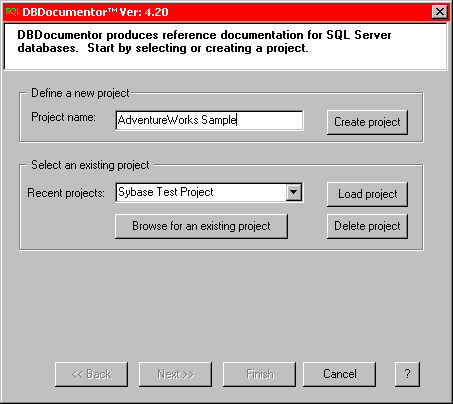
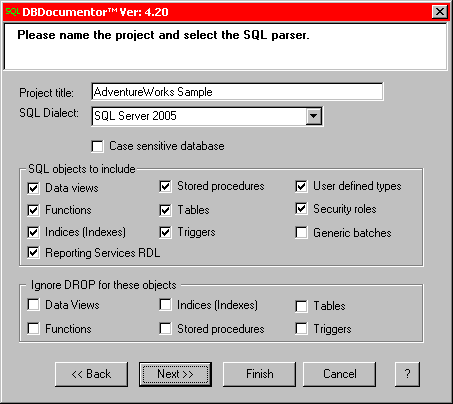
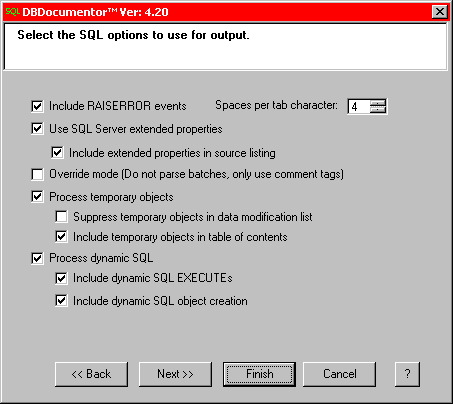
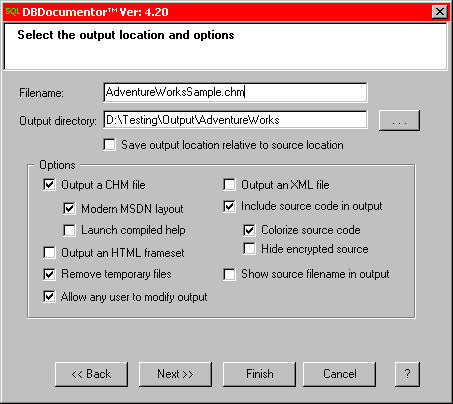
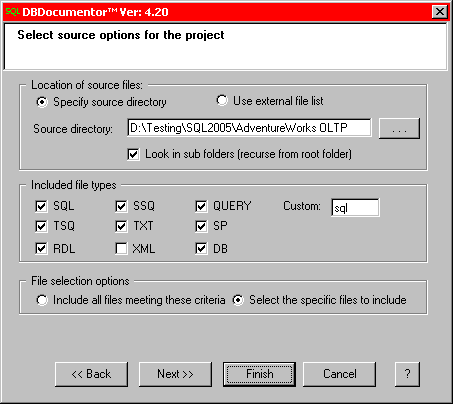
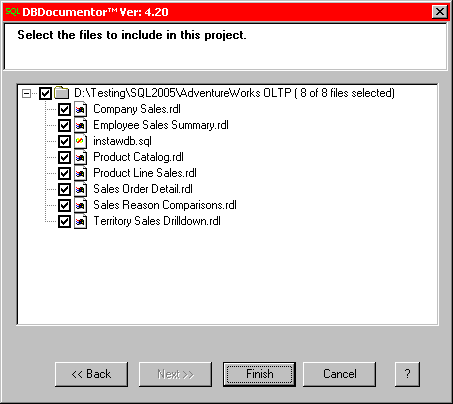
DBDocumentor uses project files to define exactly what is to be documented, and how the output is to be created. The core DBDocumentor project file is defined by the GUI interface. Once the core project file is defined, there are many advanced options, such as fixed content and custom tables of contents, which can be defined in a an XML project file. More information on these advanced options can be found in the manual. For this simple project, only the GUI interface will be used. To start, give the project a name. Since we'll be using the SQL Server 2005 sample database, Adventure Works Cycle, a project name of AdventureWorks Sample has been entered. Press Create Project to begin the project definition process. This process uses four steps to completely define a project. For most users, the only significant configuration change that may be required is the selection of which SQL dialect to use. The first step of the project definition process defines the SQL dialect to use, as well as the SQL objects the parser is to include in the output documentation. It is important at this point to ensure that you have selected the correct SQL dialect for the SQL source you will be supplying to DBDocumentor. Since you have only just downloaded DBDocumentor, it will be running in trial mode. In trial mode there are essentially three limitations to the operation of DBDocumentor; you can only document 10 SQL objects, you can not run the command line processor, and you can not supply your own copyright notice. In registered mode, there is no limitation on the number of SQL objects that you can include in the output document. For the purposes of this example, a registered version of DBDocumentor was used, and all SQL objects were selected for inclusion in the output. Once you've selected the relevant SQL dialect, and objects to include, pressing the Next button will take you the screen which configures the various SQL parser options. Depending upon the SQL dialect chosen, some of the options may not be available, and others may have different names that those shown in the image to the left. Microsoft has very nicely provided a full annotation of their sample database using the SQL Server extended properties, so those options are selected. Since we want to build as complete a document as possible, error messages, temporary objects, and dynamic SQL are all included. After you've configured the SQL parser, pressing the Next button will take you to the screen which configures the options for the DBDocumentor generated output. Output options include stylistic items such as the layout type, source code inclusion and colorization as well as the type of output to generate, CHM or XML. Once again, since we want to build as complete a document as possible, a colorized output with all source code included following a modern MSDN layout is used. Now that the output options have been defined, pressing the Next button will take you to the first of two screens defining the SQL source options. On this first screen, you select the source code location, and the file types to choose from. Once those are defined, pressing the Next button takes you to the screen from which to select the source files. After you've selected the appropriate files, press the Finish button to begin the documentation process. |
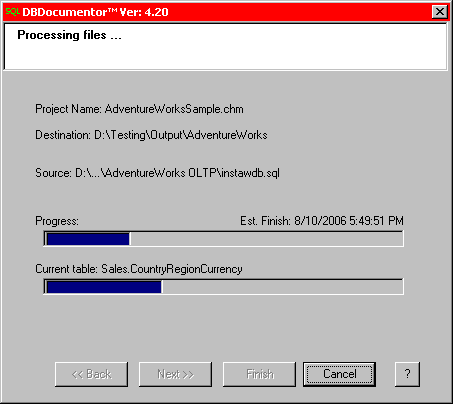 |
DBDocumentor processes the SQL source files in several distinct stages, all of which are designed to maximize the flexibility of the documentation process. In the first stage, the SQL source or script file is opened and split into component batches. A SQL batch is nothing more than a group of commands to be processed as a single unit, and DBDocumentor processes each batch as an atomic unit. Since a batch can contain dynamic SQL, if DBDocumentor is configured to process dynamic SQL, any dynamic SQL is first processed to generate sub-batches which are then treated exactly as any other SQL batch.
Once batch separation has occurred, DBDocumentor processes each batch for the SQL objects configured for inclusion in the first step of project definition. In the case of this example, all SQL Server 2005 objects were included, so if they are present in the source SQL, they will be present in the output document. As each object is processed, any annotation associated with that object is also processed and included with the documentation for the object. If a DROP is encountered for any SQL object already processed, and DBDocumentor is configured to omit any dropped objects, the object DROP is processed and the SQL object is removed from inclusion in the database representation.
At this point, a complete representation of every object processed has been made, independent of the order in which the CREATE statement occurred, and if the CREATE occurred in dynamic SQL. It is this representation which provides the data for DBDocumentor to hyperlink all object references. During the process of relationship mapping, DBDocumentor also processes any user defined object groupings, generates the table of contents and prepares to output the actual HTML files. Once all parsing has completed, and the relationships are mapped, DBDocumentor writes out HTML files for all the SQL objects, user supplied example code, source code, summary pages and the table of contents. Assuming the an output CHM is desired, final processing consists of DBDocumentor invoking the Microsoft HTML Help Workshop to compile the HTML output into a final CHM.
DBDocumentor produced CHM output is prefect for use as a reference database document or as a learning tool. If CHM output presents problems for you, you have the option of using the HTML files directly, or using the XML SQLDocumentation output. While the XML output option is only available in fully registered versions, the XML file does contain the entire database documentation, including all SQL source code (colorized if configured), examples, an index, table of contents, and all the relationships.
The output document from this example can be found here: Adventure Works Output (855KB). Total processing time for this project on a 1.8GHz Pentium 4 machine, including SQL colorization and HTML Help Workshop processing, was just under 3 minutes.
Hopefully, if you've read this far, you will agree that DBDocumentor appears to be fast, easy to use and produce comprehensive SQL database documentation. The question then remains if it can work for you. If you are looking to document Microsoft SQL Server, Firebird SQL, or Sybase SQL Anywhere databases, you can answer that question easily by downloading a free evaluation copy. If you prefer to evaluate a fully operational version of DBDocumentor, a time limited, low cost temporary license can be arranged, simply contact Pikauba Software Sales.
Download Links
Licensing
DBDocumentor is licensed as either a single user, or as a domain license. Learn more about the licensing options.
Pricing
Pricing starts at 160$ US Dollars for a single user license. Learn more about purchasing options.
© 2001 - 2009 Pikauba Software. All rights reserved.
DBDocumentor and SQLDocumentation are trademarks of Pikauba Software.
All other trademarks are properties of their respective owners.